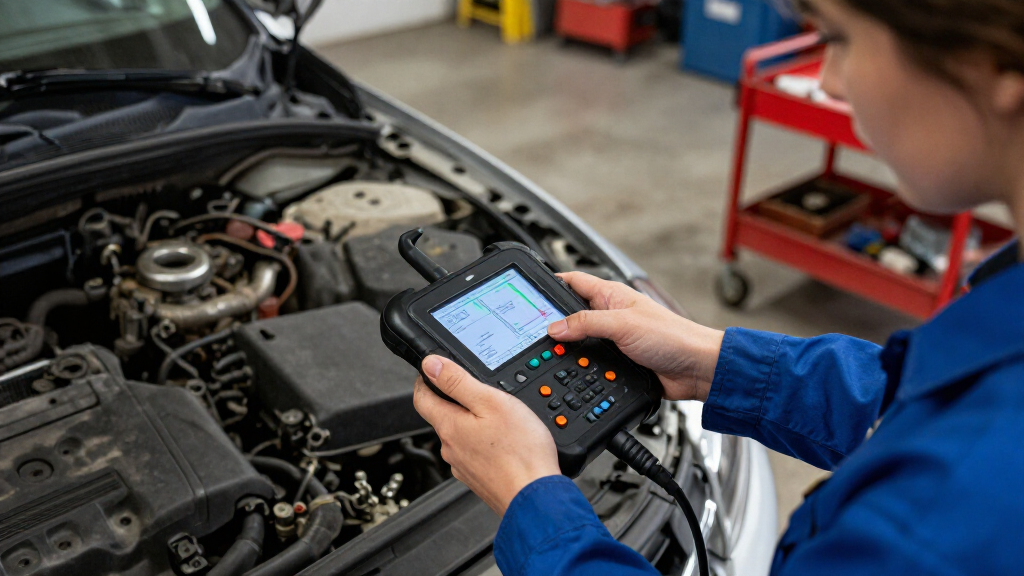

Choosing a car diagnostic scanner comes down to how much of the vehicle you need to diagnose. A basic OBD-II scanner is built for common engine and emissions faults, such as checking why the warning light is on. A professional scanner typically costs more but can reach additional systems, display richer data, and perform selected service or test functions. That difference matters when a fault sits outside the engine computer or when a repair requires more than reading a code.

Get business pricing on garage and car supplies
- Business-only prices and quantity discounts
- Tax-exempt purchasing
- Multiple users, one account, clear invoices

EDIAG H361 Bidirectional OBD2 Diagnostic Scanner with Lifetime Free Updates
- ✔ Systems: Engine, transmission, ABS and SRS
- ✔ Maintenance functions: 16; availability varies by vehicle
- ✔ Display: 6-inch touchscreen with physical buttons

FOXWELL NT301 OBD2 Scanner with Live Data
- ✔ Model: NT301
- ✔ Display: 2.8-inch color screen
- ✔ Functions: Reads and clears engine codes; live-data graphing; emissions readiness

ANCEL AD310 OBD II Car Code Reader
- ✔ Model: AD310
- ✔ Cable length: 2.5 ft
- ✔ Weight: 12 oz
For an owner who wants to understand a warning light before visiting a mechanic, the basic scanner is usually the sensible buy. For a home mechanic working across several makes, or a repair shop that needs deeper access, the professional tool can justify its higher cost. Vehicle compatibility, software subscriptions, and the specific functions supported matter as much as the label on the box, so buyers should check the exact scanner against their cars and intended jobs.
At a Glance
| Criteria | Basic OBD-II Scanner | Professional Car Diagnostic Scanner | Winner |
|---|---|---|---|
| Typical diagnostic coverage | Common engine and emissions diagnostics on OBD-II-compliant vehicles | May cover engine, transmission, ABS, airbag, and other modules, depending on tool and vehicle | B |
| Code and data detail | Basic generic codes and, on many models, live engine data and freeze-frame information | Can offer manufacturer-specific codes, expanded live data, and more diagnostic detail | B |
| Active tests and service functions | Usually limited; often cannot command components or perform system resets | May include bi-directional tests and service functions, with vehicle and tool limits | B |
| Ease of use | Generally simple menus and quick setup | More menus and setup; some functions require updates or account access | A |
| Vehicle compatibility | Broad basic coverage, with limited access beyond standardized OBD-II data | Varies by make, model, year, region, and software package; confirm coverage before buying | Depends |
| Upfront and ongoing cost | Low upfront cost; many models have no subscription | Higher upfront cost; some brands charge for updates, features, or subscriptions | A |
| Best suited to | Owners checking warning lights and simple engine faults | Frequent DIY repairers, multi-vehicle households, and professional technicians | Depends |
EDIAG H361 Bidirectional OBD2 Diagnostic Scanner with Lifetime Free Updates
The EDIAG H361 is the clear pick when “car diagnostic scanner” means more than checking the engine light. It covers engine, transmission, ABS and SRS, while the ANCEL AD310 and FOXWELL NT301 focus on engine and emissions-related functions. That wider reach can save a buyer from needing a separate reader when a warning points to a different system.Its advantage extends beyond code reading. The H361 offers bidirectional controls, live-data waveform graphs and 16 maintenance functions, giving a capable owner more ways to investigate a fault or perform supported service tasks. The six-inch touchscreen and physical buttons also provide a larger interface than the NT301’s 2.8-inch screen or the AD310’s compact reader format.That breadth comes with a compatibility caveat: functions vary by vehicle, so checking by VIN and confirming a specific maintenance or active test is essential. FCA AutoAuth also needs a separate account and paid subscription. Compared with the simpler FOXWELL, the H361 is more capable but asks the buyer to verify more before relying on a particular feature. We rank it first for its much wider diagnostic scope, not because every owner needs that scope.
Pros:
- Diagnoses engine, transmission, ABS and SRS systems.
- Bidirectional controls support supported component activation during troubleshooting.
- Offers 16 maintenance functions, live-data waveform graphs and saved diagnostic reports.
- Six-inch touchscreen, physical buttons and lifetime free updates.
Cons:
- Functions vary by vehicle and should be checked against the VIN before purchase.
- FCA AutoAuth requires a separate account and paid subscription.
- More capability and a larger interface may be unnecessary for simple engine-code checks.
Best for: Owners and technically confident DIYers who want one scanner for engine, transmission, ABS and SRS checks, and whose vehicle supports the functions they need.
Not ideal for: Buyers who only need a basic engine-code reader, or anyone unwilling to verify vehicle-specific maintenance, bidirectional and FCA AutoAuth requirements.
Bottom line: Choose the H361 when broad system coverage and active troubleshooting matter, after confirming that its specific functions support your vehicle.
“Choose the H361 when broad system coverage and active troubleshooting matter, after confirming that its specific functions support your vehicle.”
FOXWELL NT301 OBD2 Scanner with Live Data
The FOXWELL NT301 is aimed at buyers who want more help interpreting engine behavior than a basic code reader provides. It reads and clears engine fault codes, checks emissions readiness, and can display and graph live sensor data. That makes it a useful middle ground between the compact ANCEL AD310 and the substantially broader EDIAG H361.Its 2.8-inch color screen and one-click readiness check with LED and audio indicators make key results easy to spot at the vehicle. The AD310 also shows live data and freeze-frame information, but the NT301’s graphing is a more explicit aid for following sensor values. Its power comes from the vehicle’s diagnostic port, so it does not depend on a separate power source for normal use.The tradeoff is scope. The NT301 does not diagnose ABS, SRS or TPMS, and it does not offer manufacturer-specific full-system scans, service resets or key programming. Compared with the H361, it is deliberately narrower; compared with the AD310, it gives live-data work more emphasis. Compatibility and functions still vary by vehicle, so we would confirm support before expecting a particular data item or diesel application.
Pros:
- Reads and clears engine fault codes and checks emissions readiness.
- Graphs live sensor data to make changing values easier to follow.
- Color screen with LED and audio readiness indicators.
- Vehicle-powered plug-and-play operation.
Cons:
- Does not diagnose ABS, SRS or TPMS modules.
- Does not provide full-system scans, service resets or key programming.
- Supported vehicles and available functions vary by application.
Best for: DIY owners who mainly investigate engine faults and want a color display, live-data graphs and an emissions-readiness check.
Not ideal for: Buyers who need ABS, SRS, TPMS, full-system diagnostics, service resets or key programming in the scanner.
Bottom line: Pick the NT301 if graphing engine data is more useful to you than the AD310’s simpler format and you do not need the H361’s broader system access.
“Pick the NT301 if graphing engine data is more useful to you than the AD310’s simpler format and you do not need the H361’s broader system access.”
ANCEL AD310 OBD II Car Code Reader
The ANCEL AD310 is the straightforward option for drivers who want to read and clear emission-related engine codes without stepping up to a larger diagnostic tool. It also provides live data, freeze-frame data and I/M monitor readiness, so it goes beyond showing a code alone. Its small, vehicle-powered design keeps the setup simple for a quick check at the OBD II port.Compared with the FOXWELL NT301, the AD310 has a more compact, uncomplicated presentation, while the FOXWELL adds a color screen and explicit live-data graphing. The AD310 still supports multiple common OBD II protocols and has a flexible 2.5-foot cable, which can make it easier to position while reading. For a buyer focused on basic engine warnings, those core functions may be enough.Its limits are substantial if the warning involves another system. The AD310 does not scan ABS, SRS, transmission or other non-emission systems, so it cannot substitute for the H361’s broader coverage. It also requires an OBD II interface and cannot diagnose OBD I vehicles. We place it third because it is useful within a narrow task, but offers less diagnostic reach and less data visualization than the other two picks.
Pros:
- Reads and clears emission-related trouble codes.
- Displays live data, freeze-frame data and I/M monitor readiness.
- Supports major OBD II protocols across compatible vehicles.
- Compact, lightweight body with a flexible 2.5-foot cable.
Cons:
- Does not diagnose ABS, SRS, transmission or other non-emission issues.
- Requires an OBD II interface and cannot diagnose OBD I vehicles.
- Offers a more basic display experience than the NT301 and H361.
Best for: Drivers who want a compact, vehicle-powered reader for emission-related engine codes, freeze-frame information and readiness checks.
Not ideal for: Owners who need ABS, SRS, transmission or other system scans, graphing-focused live-data work, or OBD I compatibility.
Bottom line: Choose the AD310 for essential engine and emissions checks in a compact reader, but look to the H361 if you need other vehicle systems covered.
“Choose the AD310 for essential engine and emissions checks in a compact reader, but look to the H361 if you need other vehicle systems covered.”
As an Amazon Associate we earn from qualifying purchases.
Key Differences
The largest gap is system access. A basic OBD-II scanner generally communicates with standardized powertrain diagnostics, which is enough to retrieve many engine fault codes and check emissions-related readiness monitors. A professional scanner may communicate with several control modules and show vehicle-specific faults. That can be decisive when a dashboard warning comes from an ABS, airbag, or transmission system, though professional branding alone does not guarantee coverage for every module on every car.
Professional tools can also turn information into action. Some support bi-directional tests, where the scanner commands a component, or service routines such as electronic parking-brake maintenance. These functions can save time during a repair, but they are model-specific and should be verified against the vehicle. A basic scanner is cheaper and easier to use for occasional checks; it is not a substitute for advanced access when the job requires module-level diagnosis or a controlled test.
The practical choice depends on use, not the number of features listed on a product page. If you mainly want to identify a check-engine light and decide whether to investigate further, the basic scanner offers better value. If you regularly repair cars, need access beyond the engine, or can use supported service functions, the higher price of a professional tool may pay off. Check update fees and exact vehicle coverage before treating the added capabilities as guaranteed.
Detailed Comparison
Typical diagnostic coverage (Professional Car Diagnostic Scanner wins — major)
Professional scanner wins; the gap is major for faults outside the engine. A basic OBD-II scanner focuses on standardized powertrain and emissions diagnostics. A professional scanner may reach ABS, airbag, transmission, and other modules, depending on the vehicle and tool. For a check-engine warning, the basic tool may be enough. For a warning tied to another system, the professional tool has a clear advantage if it supports that vehicle.
Code and data detail (Professional Car Diagnostic Scanner wins — moderate)
Professional scanner wins; the gap is moderate to major. Basic tools commonly provide generic fault codes and some engine data, helping owners identify a likely area of concern. Higher-end tools may add manufacturer-specific codes, more live data, and additional module information. More detail can narrow a diagnosis, but a code still points to a condition rather than proving which part has failed. For routine warning-light checks, basic information can be useful; complex diagnosis benefits from the expanded data.
Active tests and service functions (Professional Car Diagnostic Scanner wins — major)
Professional scanner wins; the gap is major when a repair needs these functions. A basic scanner is generally designed to read and clear supported codes, not command vehicle components. Some professional models can run active tests or service routines, such as certain reset procedures. Availability varies by vehicle and scanner, so buyers should confirm the specific task before purchase. If you only need to read a warning light, paying for these functions brings little practical benefit.
Ease of use (Basic OBD-II Scanner wins — minor)
Basic scanner wins; the gap is minor for occasional use and more noticeable for beginners. Basic scanners tend to have fewer menus and a narrower purpose: connect, read codes, and review available data. Professional tools may require navigating multiple modules, installing updates, or understanding more technical readings. That complexity can be worthwhile for someone diagnosing repairs, but it can slow down an owner who only wants a quick first look.
Vehicle compatibility (moderate difference)
It depends; the gap is moderate. Standardized OBD-II functions offer basic scanner users relatively broad access to common engine diagnostics on compliant vehicles. Professional tools may cover more systems, but their enhanced features can vary sharply by make, model, year, and region. A professional scanner that lacks support for a particular ABS module may not help with that fault. Compare the manufacturer’s compatibility list with the exact vehicle and function you need.
Upfront and ongoing cost (Basic OBD-II Scanner wins — moderate)
Basic scanner wins on cost; the value gap depends on how often advanced features are used. Basic models usually cost less and often avoid recurring fees. Professional tools ask for more upfront, and some require paid updates or subscriptions for continued access to features. That extra spend can make sense for frequent repair work across supported vehicles. For occasional engine-code checks, the additional capability is unlikely to repay the difference.
Best suited to (moderate difference)
Depends on the user; each option wins for a different kind of work. The basic scanner fits an owner who wants to read common codes and gather information before deciding on a repair. The professional scanner fits a frequent DIY mechanic or technician who needs broader access and can use supported tests or service routines. The gap is major for multi-system repair work and minor for simple warning-light checks.
Basic OBD-II Scanner: Pros and Cons
Pros:
- Affordable way to read many common engine and emissions codes
- Usually simple to connect and operate
- Often avoids subscriptions and costly software updates
- Useful for checking basic live engine data and readiness monitors on supported vehicles
Cons:
- Usually cannot diagnose faults in ABS, airbag, and other non-engine modules
- Limited manufacturer-specific data and repair functions
- Clearing a code does not identify or fix the underlying problem
Professional Car Diagnostic Scanner: Pros and Cons
Pros:
- May access multiple vehicle systems and manufacturer-specific codes
- Some models provide expanded live data, active tests, or service functions
- More capable for repeat repair work and faults outside the engine system
Cons:
- Higher upfront cost, with possible update or subscription fees
- Coverage for enhanced functions varies by vehicle and scanner
- More menus and technical information can take time to learn
Who Should Choose What
Choose Basic OBD-II Scanner if:
- You mainly want to investigate a check-engine light or common emissions fault.
- You work on one car occasionally and do not need module-level tests.
- You want a low-cost tool without paying for advanced features you rarely use.
Choose Professional Car Diagnostic Scanner if:
- You regularly diagnose or repair several vehicles.
- You need to check systems such as ABS, airbag, or transmission and have confirmed the scanner supports your vehicle.
- You will use its active tests or service functions often enough to justify the price and any ongoing fees.
Skip both if: Skip both as a repair solution if you need a confirmed diagnosis for a complex, safety-related fault or lack the tools and experience to perform the repair. A scanner reports information; it does not replace proper diagnosis or a qualified technician.
Value for Money
For most drivers who want to check an engine warning, the basic OBD-II scanner is the better value. It covers the common first question—what code is present?—at a much lower cost. Paying more makes sense when you have a defined need for additional modules, manufacturer-specific information, or repair functions, and the tool confirms support for your vehicle. A professional scanner used only to retrieve generic engine codes is poor value. Include software renewals in the calculation, since a low purchase price can be offset by recurring fees.
Final Verdict
Choose a basic OBD-II scanner if you want an affordable first look at common engine and emissions problems. It is the right fit for most owners who check warning lights occasionally and can take the retrieved code to a mechanic or use it as a starting point for research. Choose a professional scanner if you do regular repair work and need broader system access, richer data, or supported service functions. The deciding factor is whether you will use those advanced capabilities on vehicles the tool actually supports. For occasional checks, keep the money; for repeated multi-system diagnosis, the professional scanner earns its higher price.
Frequently Asked Questions
Can a basic OBD-II scanner read an ABS or airbag warning?
Usually not. Basic OBD-II scanners focus on standardized engine and emissions diagnostics. Some products advertise extra system coverage, but confirm that the exact model supports the vehicle and module in question.
Does a professional scanner tell me exactly which part to replace?
No. A fault code describes a detected condition or circuit and can help narrow the search, but it does not prove a particular part has failed. Diagnosis may require checking wiring, live readings, and related components.
Is a more expensive scanner compatible with every car?
No. Basic OBD-II coverage is standardized for common powertrain diagnostics on compliant vehicles, while advanced functions can depend on make, model, year, region, and software version. Check the manufacturer’s coverage list before buying.
Is clearing a warning code the same as fixing the problem?
No. Clearing a code erases stored information and may turn off a warning temporarily, but the underlying fault can return. Read and record the codes before clearing them, and address the cause of the warning.